How To & Tips
How to Clean Your Dolphin Liberty Pool Cleaner Tracks and Driving System
23 September, 2026
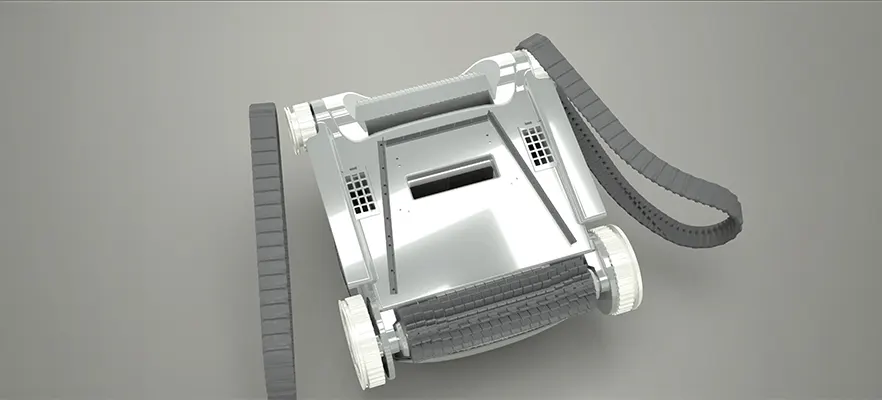
Your Dolphin Liberty cordless robotic pool cleaner is designed to make pool maintenance easier, but like any pool equipment, it benefits from regular care. The tracks and driving system are particularly important because they help the cleaner move across the pool floor, maintain traction, and climb walls.
Over time, hair, leaves, dirt, fibres, mineral residue, and other debris can become trapped around the tracks and moving components. This can affect traction and may cause your pool cleaner to move slowly, slip, spin in place, or have difficulty climbing the walls.
Fortunately, cleaning the tracks and checking the driving system is a simple part of routine Dolphin maintenance.
Why Should You Clean Your Dolphin Liberty Pool Cleaner Tracks?
The tracks are among the main contact points between your Dolphin Liberty and the pool surface. They work with the cleaner's drive system to provide the traction needed for movement and wall climbing.
Maytronics recommends regularly inspecting the brushes and tracks for debris, wear and damage. Worn, loose or damaged tracks can contribute to reduced traction and inconsistent climbing performance.
Regular cleaning can help:
Remove hair, fibres, leaves and other debris
Maintain traction against pool surfaces
Reduce unnecessary wear on the driving components
Support consistent movement and wall climbing
Keep your robotic pool cleaner operating efficiently
What You Will Need
For basic track cleaning, you generally only need:
A clean, soft cloth
A soft brush or toothbrush
Fresh water from a garden hose
A clean, dry surface or towel
Avoid harsh chemicals, abrasive cleaning tools and metal brushes that could damage the cleaner's components.
If you discover damaged tracks or components that require replacement, use genuine Maytronics parts and consult your local Maytronics Elite Dealer for advice.
How to Clean Your Dolphin Liberty Cordless Pool Cleaner Tracks
1. Remove the Dolphin Liberty from the Pool
Always remove your Dolphin Liberty from the water before carrying out maintenance.
Lift the cleaner using its designated handle rather than pulling it by any cable or other component. Place it on a clean, dry surface where you can safely inspect the underside.
For cordless models, make sure the cleaner is switched off before beginning maintenance.
2. Inspect the Tracks
Turn the cleaner over carefully so you can access the tracks.
Look closely for:
Hair or fibres wrapped around the track
Leaves and twigs
Sand, grit or other debris
Mineral residue
Cracks or visible damage
Loose, stretched or deformed sections
Uneven wear
Maytronics advises checking tracks for cracks, flattening and signs of hardening as part of routine robotic pool cleaner maintenance.
3. Remove Hair and Tangled Debris
Use your fingers or a soft brush to remove hair, string, fibres and other material caught around the tracks.
Work carefully around the track and wheels. Do not pull aggressively on the track, particularly if you notice it is already loose or damaged.
If debris is tightly wrapped around a moving component and cannot be removed easily, stop rather than forcing it.
4. Rinse the Tracks with Fresh Water
Use a garden hose to rinse the tracks and surrounding areas.
Fresh water helps remove loose dirt, sand and chemical or mineral residue that can accumulate after repeated exposure to pool water. Maytronics recommends rinsing Dolphin pool cleaners after use to help remove excess chemicals and prevent buildup on components.
Pay particular attention to areas where debris has collected between the track and the wheels.
5. Gently Brush Away Stubborn Debris
If dirt remains after rinsing, use a soft brush or toothbrush to gently loosen it.
Avoid metal brushes or aggressive scrubbing. The goal is to remove debris without damaging the track material or surrounding components.
Rinse the area again once the debris has been loosened.
6. Check the Driving System
With the tracks clean, inspect the visible parts of the driving system.
Look for anything that could interfere with movement, including:
Hair or fibres around the wheels
Sand or grit
Leaves or small sticks
Signs of physical damage
Excessive looseness
Unusual movement or resistance
If the driving system appears obstructed, carefully remove accessible debris without forcing or dismantling components that are not intended for routine user maintenance.
For maintenance involving internal components, always refer to the user manual for your specific Dolphin Liberty model.
7. Check the Tracks for Wear
Cleaning is also a good opportunity to assess whether the tracks are still in good condition. Your tracks may require attention if you notice:
Cracks
Warping
Flattening
Hardening
Significant stretching
Persistent looseness
Reduced traction despite being clean
Maytronics notes that worn tracks can cause a Dolphin robotic pool cleaner to lose traction, move sluggishly, slip or become stuck.
If your Dolphin Liberty needs replacement tracks, speak with your local Maytronics Elite Dealer to ensure you get the correct parts for your model.
What If Your Dolphin Liberty Pool Vacuum Is Not Climbing the Walls?
Dirty tracks are not the only possible cause of poor wall-climbing performance.
If your Dolphin Liberty pool cleaner is struggling to climb, first check that the filter is clean and correctly installed. Maytronics advises that clogged filters can restrict water flow and affect climbing performance.
You should also check:
The brushes for wear or debris
The tracks for damage or excessive wear
The pool walls for algae or slippery biofilm
The pool's water chemistry
The cleaner for trapped debris
Whether air is trapped inside the cleaner
Maytronics notes that algae, biofilm and unbalanced pool water can also affect how effectively a Dolphin robotic pool cleaner grips the pool surface.
If the cleaner still struggles after basic maintenance, contact an authorised Maytronics Elite Dealer for professional assistance.
How Often Should You Clean the Dolphin Liberty Robotic Pool Cleaner Tracks?
There is no single cleaning interval that suits every pool. Your maintenance frequency will depend on how often you use your pool cleaner and the amount of debris in your pool.
As a general routine:
Rinse your Dolphin Liberty pool cleaner after use
Inspect the tracks regularly
Remove hair and debris whenever you notice buildup
Check the tracks and brushes for wear during routine maintenance
Carry out a more thorough inspection before periods of heavy use
Pools surrounded by trees, gardens or dusty areas may require more frequent cleaning because more debris can enter the pool.
Do Not Forget the Rest of Your Dolphin Liberty Cordless Pool Cleaner
Keeping the tracks clean is only one part of maintaining your pool vacuum.
For the best cleaning performance, regularly check and clean the filter, brushes and other accessible components. Maytronics recommends rinsing filters after each use because trapped debris can restrict water flow and reduce cleaning performance.
After cleaning your pool cleaner, store it in a shaded, dry location away from direct sunlight and extreme temperatures. Proper storage can help reduce unnecessary wear on the cleaner's components.
Check out this video:
When Should You Contact a Maytronics Elite Dealer?
Basic cleaning and inspection can help keep your Dolphin Liberty in good condition, but some problems require professional attention.
Contact your local Maytronics Elite Dealer if:
A track is cracked or severely damaged
A track is excessively loose or stretched
The driving system makes unusual noises
The cleaner repeatedly spins or struggles to move
The cleaner cannot climb despite clean filters, brushes and tracks
You suspect an internal mechanical or electrical fault
You need genuine replacement parts
Using the correct replacement parts is important for maintaining your Dolphin's performance and reliability.
Frequently Asked Questions
How do I clean the tracks on a Dolphin Liberty Pool Cleaner?
Remove the Dolphin Liberty from the pool, switch it off and place it on a clean surface. Inspect the tracks, remove hair and debris, rinse them with fresh water and gently brush away stubborn dirt. Check the tracks and driving system for signs of damage or wear before returning the cleaner to the pool.
Why is my Dolphin Liberty pool cleaner slipping on the pool walls?
Slipping can be caused by worn or dirty tracks and brushes, clogged filters, algae or biofilm on the pool surface, or water chemistry issues. Check and clean the tracks, brushes and filters first. If the problem continues, contact a Maytronics Elite Dealer.
Can I use chemicals to clean my Dolphin Liberty pool cleaner tracks?
Fresh water and gentle cleaning are generally preferable for routine maintenance. Avoid harsh chemicals and abrasive cleaning methods. Always follow the maintenance instructions for your specific Dolphin Liberty model.
How do I know if my Dolphin Liberty pool cleaner tracks need replacing?
Look for cracks, warping, hardening, flattening, stretching or excessive looseness. Reduced traction, slipping, sluggish movement or difficulty climbing can also indicate track wear.
Should I leave my Dolphin Liberty pool cleaner in the pool?
For routine storage, Maytronics recommends removing your Dolphin from the pool after use, rinsing it and storing it away from direct sunlight and extreme temperatures.
Keep Your Dolphin Liberty Pool Cleaner Moving at Its Best
Your Dolphin Liberty is built to take much of the work out of pool maintenance, but regular care helps it continue delivering reliable cleaning performance. Cleaning the tracks, removing trapped debris and checking the driving system can help maintain traction and support effective floor and wall cleaning.
A few minutes of maintenance after use can go a long way towards keeping your cordless robotic pool cleaner operating efficiently.
For model-specific maintenance advice, genuine replacement parts or professional servicing, contact your local Maytronics Elite Dealer.
Ready to get more from your Dolphin pool cleaner? Explore the latest Maytronics robotic pool cleaner range and find the right solution for your pool.
Pool Cleaner
pool vacuum
commercial pool cleaner
robotic pool cleaner